XML-RPC is a legacy WordPress protocol that once enabled remote publishing and app integrations but has since been replaced by the more secure and flexible REST API. Despite this, XML-RPC remains enabled by default and is often exploited for brute-force logins and DDoS amplification.
If you’re not using tools like Jetpack or the WordPress mobile app, it’s best to disable XML-RPC to reduce security risks.
How to check if XML-RPC is enabled on your website
Go to this address: https://your-website-url.com/xmlrpc.php, for example: https://taihoang.com/xmlrpc.php
If you see this message:
XML-RPC server accepts POST requests only.
Then, XML-RPC is enabled on your website.
How to disable XML-RPC
You can disable XML-RPC in several ways depending on your environment setup. Choose one of the methods below — or combine them — for stronger security.
Method 1: Disable XML-RPC in your web server (Nginx or Apache)
For Nginx, add this code to the server block:
## Block all requests to /xmlrpc.php
location = /xmlrpc.php {
	deny all;
	access_log off;
	log_not_found off;
}
Code language: Nginx (nginx)
For Apache, add this code to .htaccess file:
<Files "xmlrpc.php">
    Require all denied
</Files>
Code language: Apache (apache)
Method 2: Block all requests to XML-RPC on Cloudflare
If your site is behind Cloudflare, you can block all requests to xmlrpc.php file at the edge. This not only improves security but also reduces server load. To do this, go to your Cloudflare dashboard, then:
- Choose your website → Security → Security rules.
- Hit the Create rule button → Custom rules.
- Then set up the rule as in the picture below:
- Field:
URI Path - Operator:
contains - Value:
xmlrpc.php - Then take action:
Block
- Field:
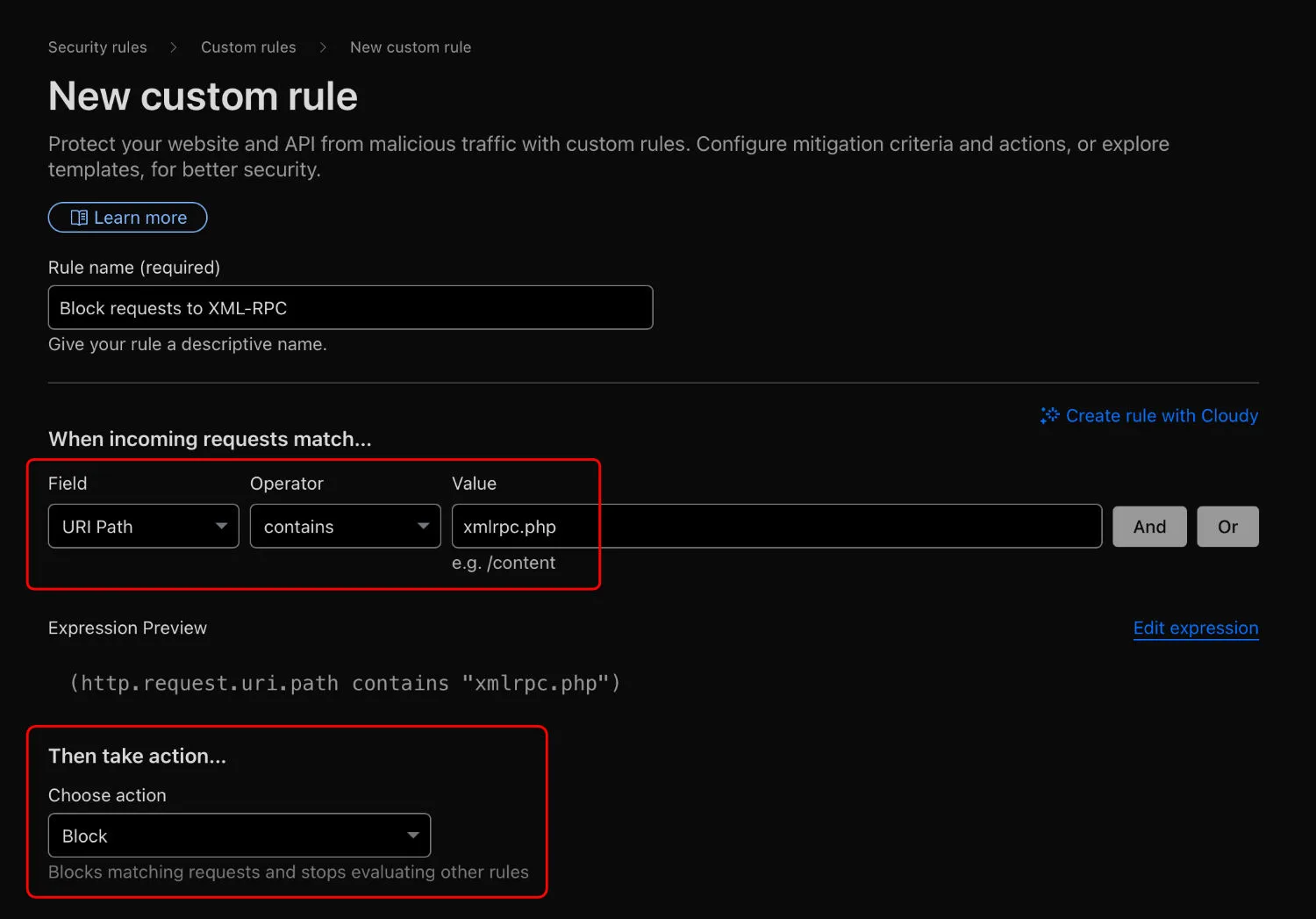
With this rule in place, any request containing xmlrpc.php in the URL will be blocked instantly before it reaches your server.
Done. Your site is now protected from XML-RPC attacks while also saving server resources and improving overall performance.